

如何用Python中的Turtle库画出哆啦A梦和小猪佩奇?
1.哆啦A梦“只要把愿望系在竹竿上请求月亮女神,心愿便能达成”。我超喜欢这句话。哆啦A梦的创造要追溯到1969年的某个截稿日,作者藤子·F·不二雄的家里突然闯进了一只小猫,虽然很快就要截稿了,但作者还是和小猫玩了起来,还替小猫挠虱子,而这一挠就是几个小时。等作者发现时间不够用的时候,已经来不及完成稿子。这时作者像热锅上的蚂蚁走来走去,突然踢到了女儿的不倒翁玩具,于是作者灵光一现,把猫的形象和不倒翁结合起来,就创造了哆啦A梦。2.小猪佩奇对比于国内的《喜羊羊与灰太狼》和《熊出没》
1.哆啦A梦
“只要把愿望系在竹竿上请求月亮女神,心愿便能达成”。我超喜欢这句话。
哆啦A梦的创造要追溯到1969年的某个截稿日,作者藤子·F·不二雄的家里突然闯进了一只小猫,虽然很快就要截稿了,但作者还是和小猫玩了起来,还替小猫挠虱子,而这一挠就是几个小时。等作者发现时间不够用的时候,已经来不及完成稿子。这时作者像热锅上的蚂蚁走来走去,突然踢到了女儿的不倒翁玩具,于是作者灵光一现,把猫的形象和不倒翁结合起来,就创造了哆啦A梦。
2.小猪佩奇
对比于国内的《喜羊羊与灰太狼》和《熊出没》,我希望有一天喜羊羊被灰太狼炖了、熊大被光头强一枪打中,然后直接卖到动物园。(哈哈哈......)可是这个想法一直没实现,有些失落。还是看小猪佩奇吧:
由英国E1 Kids于2004年5月31日发行首播后,其动画片已于全球180个地区播放,现已播出6季;
中国中央电视台少儿频道也在热播之中,极简的动画风格,幽默的对话语调,深具教育意义的故事情节,不仅能让学龄前儿童学习知识,更能让小朋友们从小养成良好的生活习惯体验生活,深受全球各地小朋友们以及其家长们的喜爱。
3.Python代码实现(哆啦A梦)
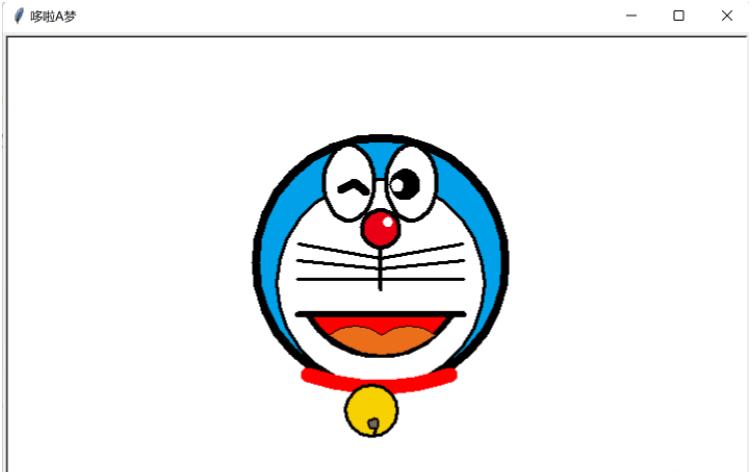
import turtle as t
t.title('哆啦A梦')
# t.speed(5)
t.pensize(8)
t.hideturtle()
t.screensize(500, 500, bg='white')

"""猫脸"""
t.fillcolor('#00A1E8')
t.begin_fill()
t.circle(120)
t.end_fill()
t.pensize(3)
t.fillcolor('white')
t.begin_fill()
t.circle(100)
t.end_fill()
t.pu()
t.home()
t.goto(0, 134)
t.pd()
t.pensize(4)
t.fillcolor("#EA0014")
t.begin_fill()
t.circle(18)
t.end_fill()
t.pu()
t.goto(7, 155)
t.pensize(2)
t.color('white', 'white')
t.pd()
t.begin_fill()
t.circle(4)
t.end_fill()
t.pu()
t.goto(-30, 160)
t.pensize(4)
t.pd()
t.color('black', 'white')
t.begin_fill()
a = 0.4
for i in range(120):
    if 0 <= i < 30 or 60 <= i < 90:
        a = a + 0.08
        t.lt(3)  # 向左转3度
        t.fd(a)  # 向前走a的步长
    else:
        a = a - 0.08
        t.lt(3)
        t.fd(a)
t.end_fill()
t.pu()
t.goto(30, 160)
t.pensize(4)
t.pd()
t.color('black', 'white')
t.begin_fill()
for i in range(120):
    if 0 <= i < 30 or 60 <= i < 90:
        a = a + 0.08
        t.lt(3)  # 向左转3度
        t.fd(a)  # 向前走a的步长
    else:
        a = a - 0.08
        t.lt(3)
        t.fd(a)
t.end_fill()
t.pu()
t.goto(-38, 190)
t.pensize(8)
t.pd()
t.right(-30)
t.forward(15)
t.right(70)
t.forward(15)
t.pu()
t.goto(15, 185)
t.pensize(4)
t.pd()
t.color('black', 'black')
t.begin_fill()
t.circle(13)
t.end_fill()
t.pu()
t.goto(13, 190)
t.pensize(2)
t.pd()
t.color('white', 'white')
t.begin_fill()
t.circle(5)
t.end_fill()
t.pu()
t.home()
t.goto(0, 134)
t.pensize(4)
t.pencolor('black')
t.pd()
t.right(90)
t.forward(40)
t.pu()
t.home()
t.goto(0, 124)
t.pensize(3)
t.pencolor('black')
t.pd()
t.left(10)
t.forward(80)
t.pu()
t.home()
t.goto(0, 114)
t.pensize(3)
t.pencolor('black')
t.pd()
t.left(6)
t.forward(80)
t.pu()
t.home()
t.goto(0, 104)
t.pensize(3)
t.pencolor('black')
t.pd()
t.left(0)
t.forward(80)
"""左边的胡子"""
t.pu()
t.home()
t.goto(0, 124)
t.pensize(3)
t.pencolor('black')
t.pd()
t.left(170)
t.forward(80)
t.pu()
t.home()
t.goto(0, 114)
t.pensize(3)
t.pencolor('black')
t.pd()
t.left(174)
t.forward(80)
t.pu()
t.home()
t.goto(0, 104)
t.pensize(3)
t.pencolor('black')
t.pd()
t.left(180)
t.forward(80)
t.pu()
t.goto(-70, 70)
t.pd()
t.color('black', 'red')
t.pensize(6)
t.seth(-60)
t.begin_fill()
t.circle(80, 40)
t.circle(80, 80)
t.end_fill()
t.pu()
t.home()
t.goto(-80, 70)
t.pd()
t.forward(160)
t.pu()
t.home()
t.goto(-50, 50)
t.pd()
t.pensize(1)
t.fillcolor("#eb6e1a")
t.seth(40)
t.begin_fill()
t.circle(-40, 40)
t.circle(-40, 40)
t.seth(40)
t.circle(-40, 40)
t.circle(-40, 40)
t.seth(220)
t.circle(-80, 40)
t.circle(-80, 40)
t.end_fill()
# 领带
t.pu()
t.goto(-70, 12)
t.pensize(14)
t.pencolor('red')
t.pd()
t.seth(-20)
t.circle(200, 30)
t.circle(200, 10)
"""铃铛"""
t.pu()
t.goto(0, -46)
t.pd()
t.pensize(3)
t.color("black", '#f8d102')
t.begin_fill()
t.circle(25)
t.end_fill()
t.pu()
t.goto(-5, -40)
t.pd()
t.pensize(2)
t.color("black", '#79675d')
t.begin_fill()
t.circle(5)
t.end_fill()
t.pensize(3)
t.right(115)
t.forward(7)
t.mainloop()
4.Python代码实现(小猪佩奇 )
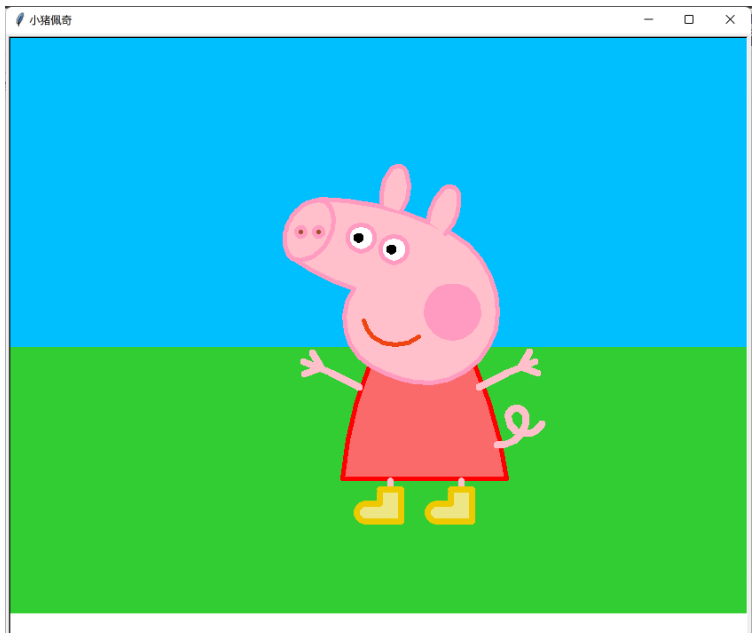
 import turtle
from turtle import *
turtle.title('小猪佩奇')

def nose(x,y):
    """画鼻子"""
    pensize(5)
    pencolor((255, 155, 192))
    penup()
    # 将海龟移动到指定的坐标
    goto(x,y)
    pendown()
    # 设置海龟的方向(0-东、90-北、180-西、270-南)
    setheading(-30)
    begin_fill()
    fillcolor(255, 192, 203)
    a = 0.4
    for i in range(120):
        if 0 <= i < 30 or 60 <= i <90:
            a = a + 0.08
            # 向左转3度
            left(3)
            # 向前走
            forward(a)
        else:
            a = a - 0.08
            left(3)
            forward(a)
    end_fill()
    penup()
    setheading(90)
    forward(25)
    setheading(0)
    forward(10)
    pendown()
    """设置画笔的颜色(红, 绿, 蓝)"""
    pencolor(255, 155, 192)
    setheading(10)
    begin_fill()
    circle(5)
    color(160, 82, 45)
    end_fill()
    penup()
    setheading(0)
    forward(20)
    pendown()
    pencolor(255, 155, 192)
    setheading(10)
    begin_fill()
    circle(5)
    color(160, 82, 45)
    end_fill()


def head(x, y):
    """画头"""
    color((255, 155, 192), "pink")
    penup()
    goto(x,y)
    setheading(0)
    pendown()
    begin_fill()
    setheading(180)
    circle(300, -30)
    circle(100, -60)
    circle(80, -100)
    circle(150, -20)
    circle(60, -95)
    setheading(161)
    circle(-300, 15)
    penup()
    goto(-100, 100)
    pendown()
    setheading(-30)
    a = 0.4
    for i in range(60):
        if 0<= i < 30 or 60 <= i < 90:
            a = a + 0.08
            lt(3) #向左转3度
            fd(a) #向前走a的步长
        else:
            a = a - 0.08
            lt(3)
            fd(a)
    end_fill()


def ears(x,y):
    """画耳朵"""
    color((255, 155, 192), "pink")
    penup()
    goto(x, y)
    pendown()
    begin_fill()
    setheading(100)
    circle(-50, 50)
    circle(-10, 120)
    circle(-50, 54)
    end_fill()
    penup()
    setheading(90)
    forward(-12)
    setheading(0)
    forward(30)
    pendown()
    begin_fill()
    setheading(90)
    circle(-50, 50)
    circle(-10, 120)
    circle(-50, 56)
    end_fill()


def eyes(x,y):
    """画眼睛"""
    color((255, 155, 192), "white")
    penup()
    setheading(90)
    forward(-20)
    setheading(0)
    forward(-95)
    pendown()
    begin_fill()
    circle(15)
    end_fill()
    color("black")
    penup()
    setheading(90)
    forward(12)
    setheading(0)
    forward(-3)
    pendown()
    begin_fill()
    circle(3)
    end_fill()
    color((255, 155, 192), "white")
    penup()
    seth(90)
    forward(-25)
    seth(0)
    forward(40)
    pendown()
    begin_fill()
    circle(15)
    end_fill()
    color("black")
    penup()
    setheading(90)
    forward(12)
    setheading(0)
    forward(-3)
    pendown()
    begin_fill()
    circle(3)
    end_fill()


def cheek(x,y):
    """画脸颊"""
    color((255, 155, 192))
    penup()
    goto(x,y)
    pendown()
    setheading(0)
    begin_fill()
    circle(30)
    end_fill()


def mouth(x,y):
    """画嘴巴"""
    color(239, 69, 19)
    penup()
    goto(x, y)
    pendown()
    setheading(-80)
    circle(30, 40)
    circle(40, 80)

def body(x,y):
    '''画身体'''
    penup()
    goto(x,y)
    pencolor('red')
    fillcolor(250,106,106)
    pendown()
    begin_fill()
    setheading(-66)
    circle(-450,17)
    setheading(180)
    forward(185)
    setheading(85)
    circle(-450,17)
    end_fill()
    '''右手'''
    penup()
    goto(110,-45)
    pendown()
    pensize(8)
    pencolor(255, 192, 203)
    setheading(30)
    circle(-400,10)
    penup()
    goto(167,-5)
    pendown()
    setheading(-120)
    forward(20)
    left(100)
    forward(20)
    '''左手'''
    penup()
    goto(-25,-45)
    pendown()
    pencolor(255, 192, 203)
    setheading(150)
    circle(400,10)
    penup()
    goto(-78,-6)
    pendown()
    setheading(-60)
    forward(20)
    right(100)
    forward(20)

def feet1(x,y):
    pensize(7)
    pencolor(255, 192, 203)
    penup()
    goto(x,y)
    setheading(-90)
    pendown()
    forward(10)
    penup()
    goto(x-12,y-10)
    pendown()
    pencolor(238,201,0)
    fillcolor(238,230,132)
    begin_fill()
    setheading(0)
    forward(24)
    right(90)
    forward(36)
    right(90)
    forward(40)
    circle(-10,180)
    forward(16)
    left(90)
    forward(12)
    end_fill()

def feet2(x,y):
    pensize(7)
    pencolor(255, 192, 203)
    penup()
    goto(x,y)
    setheading(-90)
    pendown()
    forward(10)
    penup()
    goto(x-12,y-10)
    pendown()
    pencolor(238,201,0)
    fillcolor(238,230,132)
    begin_fill()
    setheading(0)
    forward(24)
    right(90)
    forward(36)
    right(90)
    forward(40)
    circle(-10,180)
    forward(16)
    left(90)
    forward(12)
    end_fill()

def tail(x,y):
    pensize(8)
    penup()
    goto(x,y)
    pendown()
    pencolor(255, 192, 203)
    setheading(-5)
    circle(30,100)
    circle(10,180)
    circle(20,150)

def backg(x):
    penup()
    goto(-420,x)
    setheading(0)
    fillcolor(50,205,50)
    begin_fill()
    forward(840)
    right(90)
    forward(300)
    right(90)
    forward(840)
    right(90)
    forward(300)
    end_fill()
    setheading(0)
    fillcolor(0,191,255)
    begin_fill()
    forward(840)
    left(90)
    forward(600)
    left(90)
    forward(840)
    left(90)
    forward(600)
    end_fill()

def cloude1(x, y):
    """画云"""
    penup()
    goto(x,y)
    setheading(90)
    fillcolor(255,255,255)
    begin_fill()
    a = 0.4
    for i in range(120):
        if 0 <= i < 30 or 60 <= i <90:
            a = a + 0.14
            # 向左转3度
            left(3)
            # 向前走
            forward(a)
        else:
            a = a - 0.15
            left(3)
            forward(a)
    end_fill()

def cloude2(x, y):
    """画云"""
    penup()
    goto(x,y)
    setheading(90)
    fillcolor(255,255,255)
    begin_fill()
    a = 0.4
    for i in range(120):
        if 0 <= i < 30 or 60 <= i <90:
            a = a + 0.15
            # 向左转3度
            left(3)
            # 向前走
            forward(a)
        else:
            a = a - 0.13
            left(3)
            forward(a)
    end_fill()

def setting():
    """设置参数"""
    pensize(5)
    # 隐藏海龟
    hideturtle()
    colormode(255)
    color((255, 155, 192), "pink")
    setup(840, 700)
    speed(10)


def main():
    """主函数"""

    setting()
    backg(0)
    body(105,-20)
    nose(-100, 100)
    head(-69, 167)
    ears(0, 160)
    eyes(0, 140)
    cheek(80, 10)
    mouth(-20, 30)
    feet1(10,-150)
    feet2(90,-150)
    tail(130,-110)
    cloude1(-200,200)
    cloude2(300,300)
    done()


if __name__ == '__main__':
main() 
学习如何使用Python高效删除列表中的重复元素。本文提供5种常见方法的代码示例,涵盖保持顺序与不保持顺序的场景,适合初学者和进阶开发者参考。

详细讲解使用Python编写Web接口的核心步骤与完整代码示例,涵盖环境准备、路由定义、数据校验、服务启动及调试测试方法。

介绍如何利用编程工具读取和解析Word文档(docx格式),涵盖基础文本提取代码示例、结构化数据处理逻辑,以及处理复杂排版时的技术局限与替代方案。

详细讲解在Python中调用C语言代码提升性能的完整实践指南,包含原理分析、编译步骤、ctypes与CFFI具体实现、性能对比及常见陷阱。


客观对比Python与C语言在心智负担、底层机制与学习反馈上的核心差异,提供清晰有据的选择标准与切实的入门学习路径。


针对大数据工程场景,系统对比Java、Scala与Python在执行性能、生态结合、开发效率和维护成本上的核心差异,给出清晰的架构选型依据与落地方案。

本篇LangGraph Python中文入门教程详解,系统梳理StateGraph状态机定义、节点编写、边与条件路由、检查点持久化(MemorySaver)等核心机制,提供从环境安装到完整循环智能体构建的代码示例与实操指导。

面向后端开发者,基于 Python 官方文档说明如何在 Windows 上安装 Python、创建 venv 虚拟环境及使用 pip 管理依赖。包含可复制命令、验证方法及工具选择边界,避免常见配置误区。





火山引擎是字节跳动旗下企业级云与AI服务平台。聚焦大模型核心能力,依托字节自研豆包多模态大模型,凭借火山方舟一站式平台,提供模型精调、推理部署、智能应用搭建等全链路服务,结合高性能AI算力,助力各行业快速落地大模型数字化与智能化应用。



