

如何用VBS脚本收集远程计算机或本地计算机安装的软件
使用VBS脚本可收集域内远程或本地计算机的软件及Windows版本信息,结果保存为以计算机名命名的txt文件,支持网络路径或脚本目录。脚本内置过滤规则,自动剔除补丁包、Office组件及NVIDIA、Intel驱动等系统组件,兼容32位和64位系统。
先说核心目标:用VBS脚本收集域内远程或本地计算机上安装了哪些软件、Windows版本信息,然后以计算机名命名生成一个文本文件。结果可以保存到网络路径,也可以直接放在脚本所在目录。而且,这个脚本已经内置好了过滤规则——那些补丁包、Office组件、NVIDIA、Intel 驱动之类我们不关心的条目,会自动被剔除掉,省去人工筛选的麻烦。

目标
脚本的功能很明确:
- 收集域中远程计算机或本地计算机安装的软件及 Windows 版本;
- 结果保存为以计算机名命名的 .txt 文件(支持保存到网络路径或脚本所在目录);
- 兼容 32 位和 64 位系统;
- 自动过滤掉 Security Update、.NET Framework、Microsoft Visual C++、NVIDIA、Intel® 驱动等系统级组件,同时保留 Office 各版本的信息。
制作 VBS 脚本
把下面的代码复制出来,保存为一个 .vbs 文件(比如 InstalledSoftList.vbs),放到 D 盘根目录下就行。
On Error Resume Next

Const HKCU   = &h80000001
Const HKLM   = &H80000002
Const strKeyPath = "SoftwareMicrosoftWindowsCurrentVersionUninstall"
Const str64KeyPath = "SOFTWAREWow6432NodeMicrosoftWindowsCurrentVersionUninstall"
Const ForReading = 1
Const ForWriting = 2
Const ForAppending = 8

'FilePath  = "\Server-FilePCSoftList"
FilePath  = CreateObject("Scripting.FileSystemObject").GetFolder(".").Path & ""
Set Wshell   = CreateObject("Wscript.Shell")
Set objFSO   = CreateObject("Scripting.FileSystemobject")

'Set collected computers Name
set argus=wscript.arguments
if argus.count=0 then
 strComputerName = Wshell.RegRead("HKEY_LOCAL_MACHINESYSTEMCurrentControlSetServicesTcpipParametersHostname")
else
 strComputerName = argus(0)
end if

Set textWriteFile = objFSO.OpenTextFile(FilePath & ucase(strComputerName) &".txt",ForWriting,True,True)

Set objReg = GetObject("winmgmts://" & strComputerName & "/root/default:StdRegProv")

'Get OS Version
intRet = objReg.GetStringValue(HKLM, "SOFTWAREMicrosoftWindows NTCurrentVersion","ProductName",strOSVersion)
If intRet = 0 Then
 intRet = objReg.GetStringValue(HKLM, "SOFTWAREMicrosoftWindows NTCurrentVersion","CSDVersion",strOSServicePack)
 intRet = objReg.GetStringValue(HKLM, "SOFTWAREWow6432NodeMicrosoftWindows NTCurrentVersion","ProductName",str64BitOSVersion)
 if intRet = 0 then
  strOSVersion = strOSVersion & " 64bit"
 end if
 intRet = objReg.GetStringValue(HKLM, "SYSTEMCurrentControlSetControlNlsLanguage","InstallLanguage",OSLanguageCode)
 if intRet = 0 then
  select case OSLanguageCode
  case "0804" '中文
   strOSVersion = strOSVersion & " Chinese Version"
  case "0411" '日文
   strOSVersion = strOSVersion & " Japanese Version"
  case "0409" '英文
   strOSVersion = strOSVersion & " English Version"
  case else '未知语言
   strOSVersion = strOSVersion & " UnknownLanguage Version"
  end select
 end if
Else
 strOSVersion = "OS Get Failed"
 strOSServicePack = "NoFind"
End If
if InStr(LCase(strOSVersion),"windows")>0 then
 textWriteFile.WriteLine("""" & ucase(strComputerName) & """" & vbTab & """" & strOSVersion & """" & vbTab & """" & strOSServicePack & """")
end if

'Display User Software.
objReg.EnumKey HKCU, strKeyPath,arrSubKeys
For Each strSubKey In arrSubKeys
 intGet = objReg.GetDWORDValue(HKCU, strKeyPath & strSubKey,"SystemComponent",intSystemComponent)
 If IsNull(intSystemComponent) then
  intSystemComponent = 0
 End If
 intRet = objReg.GetStringValue(HKCU, strKeyPath & strSubKey,"ParentDisplayName",strName)
 If intSystemComponent = 0 and intRet > 0 then
  intRet = objReg.GetStringValue(HKCU, strKeyPath & strSubKey,"DisplayName",strName)
  If strName <> "" And intRet = 0 And ignorePgm(strName) Then
   strName = replace(replace(strName,vbCrLf,""),vbTab,"")
   intRet = objReg.GetStringValue(HKCU, strKeyPath & strSubKey,"DisplayVersion",strVersion)
   textWriteFile.WriteLine("""" & ucase(strComputerName) & """" & vbTab & """" & strName & """" & vbTab & """" & strVersion & """")
  End If
 End If
Next

'Display Machine 32bit Software.
objReg.EnumKey HKLM, strKeyPath,arrSubKeys
For Each strSubKey In arrSubKeys
 intGet = objReg.GetDWORDValue(HKLM, strKeyPath & strSubKey,"SystemComponent",intSystemComponent)
 If IsNull(intSystemComponent) then
  intSystemComponent = 0
 End If
 intRet = objReg.GetStringValue(HKLM, strKeyPath & strSubKey,"ParentDisplayName",strName)
 If intSystemComponent = 0 and intRet > 0 then
  intRet = objReg.GetStringValue(HKLM, strKeyPath & strSubKey,"DisplayName",strName)
  If strName <> "" And intRet = 0 And ignorePgm(strName) Then '
   strName = replace(replace(strName,vbCrLf,""),vbTab,"")
   intRet = objReg.GetStringValue(HKLM, strKeyPath & strSubKey,"DisplayVersion",strVersion)
   textWriteFile.WriteLine("""" & ucase(strComputerName) & """" & vbTab & """" & strName & """" & vbTab & """" & strVersion & """")
  End If
 End If
Next

'Display Machine 64bit Software.
objReg.EnumKey HKLM, str64KeyPath,arrSubKeys
For Each strSubKey In arrSubKeys
 intGet = objReg.GetDWORDValue(HKLM, str64KeyPath & strSubKey,"SystemComponent",intSystemComponent)
 If IsNull(intSystemComponent) then
  intSystemComponent = 0
 End If
 intRet = objReg.GetStringValue(HKLM, str64KeyPath & strSubKey,"ParentDisplayName",strName)
 If intSystemComponent = 0 and intRet > 0 then
  intRet = objReg.GetStringValue(HKLM, str64KeyPath & strSubKey,"DisplayName",strName)
  If strName <> "" And intRet = 0 And ignorePgm(strName) Then
   strName = replace(replace(strName,vbCrLf,""),vbTab,"")
   intRet = objReg.GetStringValue(HKLM, str64KeyPath & strSubKey,"DisplayVersion",strVersion)
   textWriteFile.WriteLine("""" & ucase(strComputerName) & """" & vbTab & """" & strName & """" & vbTab & """" & strVersion & """")
  End If
 End If
Next

textWriteFile.Close

function ignorePgm(strPgm)
 If inStr(1,strPgm,"Microsoft Office ",1)<=0 then
  '不输出Security Update、.NET Framework、Microsoft Visual C++、NVIDIA、Intel(R)的程序
  ignorePgm = inStr(1,strPgm,"Security Update",1)<=0 _
   And inStr(1,strPgm,".NET Framework",1)<=0 _
   And inStr(1,strPgm,"Microsoft Visual C++",1)<=0 _
   And inStr(1,strPgm,"NVIDIA",1)<=0 _
   And inStr(1,strPgm,"Intel(R)",1)<=0
 Else
  '让个版本的Office能正常输出
  ignorePgm = inStr(1,strPgm,"Microsoft Office ",1)>0 _
     And (inStr(1,strPgm," 2000 ",1)>0 _
      Or inStr(1,strPgm," 2003 ",1)>0 _
      Or (inStr(1,strPgm,"Microsoft Office Access ",1)=1 And inStr(1,strPgm," MUI",1)<=0) _
      Or strPgm="Microsoft Office Professional Plus 2007" _
      Or strPgm="Microsoft Office Professional Plus 2010" _
      Or strPgm="Microsoft Office Professional Plus 2016" _
      Or strPgm="Microsoft Office Standard 2007" _
      Or strPgm="Microsoft Office Standard 2010" _
      Or strPgm="Microsoft Office Standard 2016" _
      Or strPgm="Microsoft Office Standard 2019")

 End If
end function
修改结果文件保存路径
脚本里有两行代码控制文件保存的位置(见下面高亮部分)。默认情况下,它会将 .txt 文件保存在当前 VBS 脚本所在的目录。如果你想把结果统一存到某个网络共享路径下,就取消第一行的注释,把路径改好,再把第二行注释掉即可。
'FilePath  = "\Server-FilePCSoftList"
FilePath  = CreateObject("Scripting.FileSystemObject").GetFolder(".").Path & ""
测试阶段直接使用默认路径就行,不需要改。
修改过滤条件(定制你不想看到的程序名)
脚本默认过滤掉 Security Update、.NET Framework、Microsoft Visual C++、NVIDIA、Intel® 驱动这几类条目。如果你需要增加或减少过滤项,直接修改 ignorePgm 函数里的判断逻辑即可。下面这段代码就是过滤核心:
 '不输出Security Update、.NET Framework、Microsoft Visual C++、NVIDIA、Intel(R)的程序
  ignorePgm = inStr(1,strPgm,"Security Update",1)<=0 _
   And inStr(1,strPgm,".NET Framework",1)<=0 _
   And inStr(1,strPgm,"Microsoft Visual C++",1)<=0 _
   And inStr(1,strPgm,"NVIDIA",1)<=0 _
   And inStr(1,strPgm,"Intel(R)",1)<=0
初次测试可以不修改,直接运行看看效果。
测试
测试方法1:收集本机软件
直接双击 InstalledSoftList.vbs 即可。假设本机计算机名是 PC-Name01,那么在脚本所在目录就会生成一个 PC-Name01.txt 文件。
测试方法2:收集远程计算机软件
打开 CMD 命令行,执行以下命令(假设远程计算机名为 PC-Name02):
cscript d:\InstalledSoftList.vbs PC-Name02
同样会在指定目录下生成 PC-Name02.txt 文件。
测试方法2的注意事项
如果生成的 .txt 文件是空的,通常是因为以下两个原因:
- 远程计算机与运行脚本的计算机必须在同一个域内,否则 WMI 连接会失败;
- 远程计算机的防火墙必须关闭,或者至少开启入站规则允许“Windows Management Instrumentation (WMI)”通过。
以上就是这个 VBS 脚本的全部内容。实测下来,无论是本地还是远程,都能稳定获取到干净的软件列表,特别适合运维场景下批量盘点资产。
VBS脚本实现文件批量处理:一脚本从配置文件读取关键字,遍历文件夹内容,匹配后重命名添加.bak后缀并记日志;另一脚本根据文件路径列表,对衍生文件批量重命名添加.tmp后缀。
VBS调用Shell.Application的ShellExecute方法时需先创建对象。参数包括文件名、附加参数、目录、操作和窗口类型。操作包括编辑、查找、打开、打印、属性、以管理员身份运行六种,窗口类型用0至10数值控制。实战示例以管理员权限运行cmd.exe添加用户。
利用ADODB.Stream对象,VBScript可实现字符串编码转换。核心思路是先将字符串按源编码转为二进制字节流,再按目标编码还原。提供StringToBytes、BytesToString和AlterCharset三个函数,支持GB2312与ISO-8859-1等单字节编码间的转换,适用于旧系统或硬件交互场景。

通过WMI调用Win32_PingStatus实现批量Ping检测,支持循环监测与断线计数。连续失败10次自动发送邮件告警,日志和控制台同步输出。需CScript环境运行,脚本已自动处理切换,适用于多IP持续监控场景。
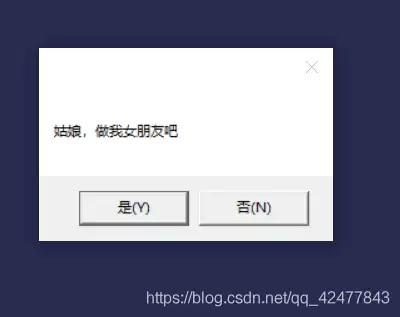
利用VBS脚本制作循环表白弹窗,点击“否”时依次显示“女友最大”“工资上交”等六个承诺,点击“是”则展现字符爱心与浪漫告白。操作需新建文本文档,粘贴代码后另存为ANSI编码的.vbs文件,双击运行即可。

利用VBS脚本通过InternetExplorer.Application对象操控网页,自动填写账号密码并提交,实现开机自动登录网站。需根据实际页面修改网址、表单及输入框的name属性。将脚本放入系统启动文件夹即可开机自启。

VBS是Windows内置脚本语言,无需安装环境,用记事本即可编写。通过Msgbox和Inputbox函数实现弹窗输出与交互。编写时需注意:文件后缀为.vbs,符号使用英文半角,编码格式改为ANSI,否则中文可能乱码。
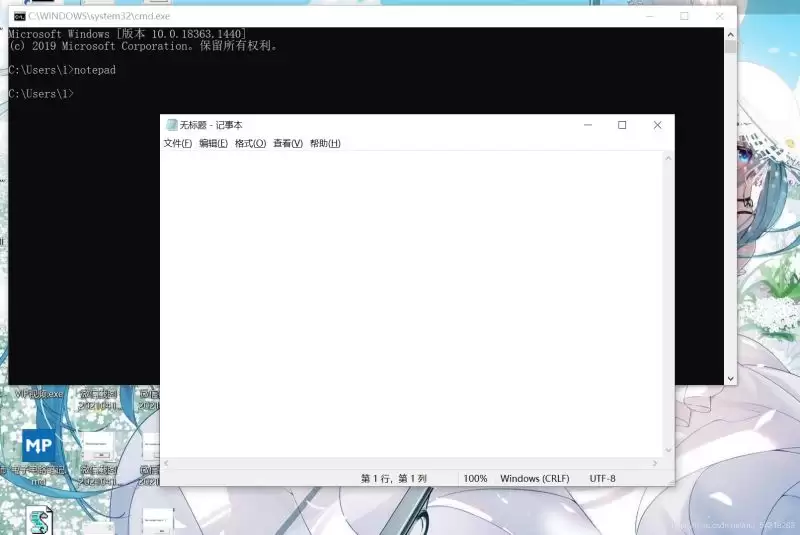
VBS脚本基础语法涵盖变量定义、输入输出、判断与循环语句。变量可用“dim”声明,支持自动类型推断;输入输出分别通过inputbox和msgbox实现;判断语句以if...then...else...endif结构为主;循环包括do-loop(支持until、while条件及exitdo控制)和for-next结构。
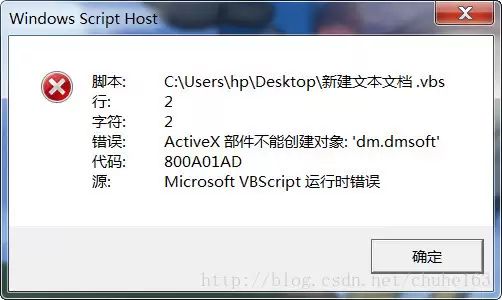
VBS脚本在64位系统中因默认调用64位WScript.exe导致32位ActiveX组件无法创建,出现800A01AD错误。可通过修改注册表将解释器切换为32位版本,或直接更改脚本打开方式为SysWOW64下的wscript.exe解决。若在ASP环境中,可重新注册ADODB.Stream组件或启用IIS应用程序池的32位模式。
VBScript利用FSO对象递归遍历文件夹,获取所有文件绝对路径并输出至调试窗口,内置计时功能评估性能。代码简洁高效,适用于快速文件清单生成及路径调试。





火山引擎是字节跳动旗下企业级云与AI服务平台。聚焦大模型核心能力,依托字节自研豆包多模态大模型,凭借火山方舟一站式平台,提供模型精调、推理部署、智能应用搭建等全链路服务,结合高性能AI算力,助力各行业快速落地大模型数字化与智能化应用。



