

c#如何用LINQ查询XML_c#LINQ查询XML从入门到精通教程
用XDocument的Descendants()查询XML比XmlDocument更稳定,可穿透任意层级并跳过非元素节点。处理带命名空间的XML需声明XNamespace并用于查询。取值时使用(string)或(int?)安全转换,避免空引用异常;判空用Any()比Count()更高效,推荐用于LINQtoXML解析。
在C#开发中,处理XML数据是家常便饭。但不少开发者一上来就踩坑,要么用XmlDocument这种老古董,要么硬写Elements()链式调用,结果遇到注释、空格或命名空间就挂掉。其实,XDocument搭配Descendants()才是稳妥的起点,它能穿透所有层级,跳过非元素节点,稳定可靠。
简单来说,XDocument + Descendants() 是最稳的起点,别碰 XmlDocument 或硬写 Elements() 链式调用——前者过时,后者一遇到注释、空格、命名空间就失效。
用 Descendants() 查任意层级节点,不依赖结构深度
XML 常有注释、处理指令、换行文本节点,Elements() 只查直接子节点,一旦 Root 下多了一行空格或一个 ,doc.Root.Elements("Item") 就返回空。而 Descendants("Item") 会穿透所有层级,跳过非元素节点,结果稳定。
- 始终从
XDocument.Load("file.xml")或XDocument.Parse(xmlString)开始,不是XmlDocument - 别写
doc.Root.Descendants("Product")——Root可能为null(比如 XML 声明后直接是注释),直接用doc.Descendants("Product") - 如果只查顶层同名节点(如根下所有
Book),且确定结构干净,Elements()略快;但日常开发中,容错比这点性能重要得多
带默认命名空间的 XML 必须声明 XNamespace
像 doc.Descendants("item") 永远为空——字符串匹配对不上命名空间隐式前缀。
- 先提取命名空间:
XNamespace ns = doc.Root?.GetDefaultNamespace() ?? ""; - 再查询:
doc.Descendants(ns + "item") - 若 XML 有多个命名空间(如
xmlns:xsi="http://www.w3.org/2001/XMLSchema-instance"),用doc.Root?.GetNamespaceOfPrefix("xsi")获取对应XNamespace - 漏掉这步,所有
Element()、Attribute()、Where()都查不到东西,错误静默,极难排查
用 Where() + Attribute() / Element() 写条件,别字符串匹配
想查 .Where(x => x.ToString().Contains("shipped"))——它会把整个节点序列化成字符串再搜,慢、不准、还可能误中子节点内容。
- 查属性值:
doc.Descendants("order").Where(x => x.Attribute("status")?.Value == "shipped") - 查子元素文本:
doc.Descendants("book").Where(x => x.Element("Author")?.Value == "Jon Skeet") - 查存在性(不取值):
doc.Descendants("book").Where(x => x.Element("Price") != null) Attribute()和Element()返回XAttribute/XElement?,安全调用?.Value,避免NullReferenceException
取值前强制转换 + 判空,别信 Value 永远有值
Element("Title").Value 在节点不存在时抛 NullReferenceException;Attribute("Id").Value 同理。LINQ to XML 不自动补默认值。
- 安全取字符串:
(string)node.Element("Title")—— 转换失败返回null,不抛异常 - 安全取数字:
(int?)node.Attribute("Id"),null表示缺失或解析失败 - 批量判空用
.Any():if (doc.Descendants("Book").Any()) { ... },比.Count() > 0快(不用遍历全部) - 性能敏感场景(如循环内多次查同一节点),把
doc.Descendants("Book")结果缓存为IEnumerable或List,避免重复遍历
命名空间和空值处理是实际项目里最常卡住人的两点,其他都好调——但一旦 XML 带了 xmlns,或者某条数据缺了 Author 字段,没做安全转换的代码就会在生产环境突然崩掉。

详解如何在 Windows 电脑上通过 Microsoft Store 安装 Codex 桌面应用,包括启动登录、切换 Codex 模式、关联本地代码项目及终端环境配置的界面操作指引。
本文详解如何在Windows环境中使用PowerShell生成SSH密钥对,配置ssh-agent自动加载私钥,并将公钥安全添加至GitHub账户,最后通过git remote set-url切换为SSH地址,解决每次操作需输入账号密码的问题。
深入解析backdrop与background在网页开发及视觉设计中的区别。通过CSS代码示例,展示如何正确使用background设置元素背景,以及利用backdrop-filter创建弹窗遮罩模糊效果,避免概念混用。
详解 Windsurf IDE 在 Windows 系统的下载来源、安装步骤及首次启动界面。指导用户如何导入编辑器设置、打开项目文件夹及使用终端与 AI 功能,适合初次接触该工具的开发者阅读。
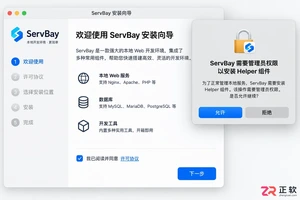
新手入门 ServBay 本地开发环境,详解安装包下载、Dashboard 状态监控、Packages 组件安装、Services 服务控制及 Websites 项目配置。掌握 .servbay.config 版本管理与日志排查技巧,快速搭建稳定的 PHP、Node.js 等多语言开发环境。
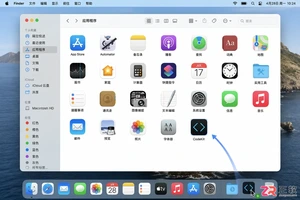
详解 CodeKit 在 macOS 下的安装步骤、项目导入方法、Sass与JavaScript编译设置及浏览器自动刷新功能,助您快速搭建高效的前端开发环境。
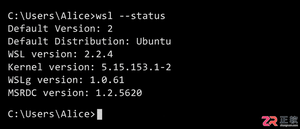
详解Windows环境下安装OpenAI Codex CLI的步骤,包括WSL环境检查、Node.js/npm配置、npm全局安装命令及首次启动验证,适合开发者快速上手。
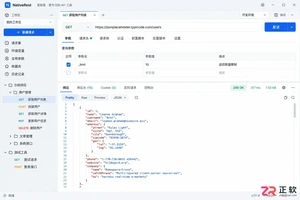
学习如何配置 NativeRest REST API 客户端。涵盖 Windows/macOS/Linux 安装后的工作区创建、环境变量管理、请求编辑及响应查看步骤,帮助开发者快速完成基础环境搭建与连通性测试。

深入解析CSS中设置透明度的核心属性opacity,剖析子元素继承、事件穿透、层叠上下文等关键注意事项,并提供与rgba、hsla的实用选型对比。




WPS Office是一款面向macOS用户的综合办公套件,将文字处理、电子表格、演示文稿、PDF工具、模板与云协作整合在同一应用中。它兼容常见Microsoft Office格式,支持Intel及Apple芯片Mac,基础功能可免费使用,
Shapr3D是一款面向工业设计、机械工程、建筑概念和三维打印工作流的CAD软件。Mac版采用Parasolid建模内核,支持草图约束、实体建模、工程图、可视化渲染及常见CAD格式交换,并可通过账户在多台设备之间同步项目。

REAPER是Cockos开发的数字音频工作站,提供多轨音频与MIDI录制、剪辑、处理、混音和母带制作工具。Mac版兼容Intel与Apple芯片,支持AU、VST、VST3、CLAP等插件格式,并提供高度可定制的工作流程。

Adobe Photoshop 是面向摄影师、设计师和内容创作者的专业图像处理工具,可在 Windows 上完成照片修饰、选区抠图、图层合成、文字排版、绘画及生成式编辑。软件采用订阅授权,由 Creative Cloud 管理安装、更新与许

Adobe InDesign 是面向印刷与数字出版的专业页面排版工具,可制作书籍、杂志、宣传册、海报、交互式 PDF 和电子书。它提供精细的文字样式、多页面管理、印前检查及多格式输出能力,并能与 Photoshop、Illustrator

Adobe Illustrator 是用于绘制矢量图形、插画、图标、徽标和版式的专业设计工具。它以路径和锚点为核心,作品放大后仍能保持清晰,并提供画板、文字、渐变、图像描摹及精确变换等功能,适合品牌视觉、印刷物料、数字界面和商业插画创作。