

kindSoft在线网页编辑器简单的配置参数介绍
KindSoft网页编辑器配置包括:引入核心脚本并初始化编辑器绑定至输入框;调整上传路径参数指向处理程序;在kindeditor.js中修改items数组以定制工具栏按钮,涵盖常用功能如字体、对齐、插入媒体等。
对于网页编辑器来说,能在项目开发中派上大用场,确实能大大减轻开发人员的负担。KindSoft 一直是个不错的选择,不少团队都在持续使用它。下面就把一些常见的配置要点整理一下。
基础引入与初始化
首先,把下载好的 KindSoft 文件放到项目目录下。然后在页面的 Head 部分引入两个核心脚本:
接着插入一段初始化代码,把编辑器绑定到指定的输入框上:
这里的 tbContent 就是你要嵌入编辑器的 Input 标签的 id 值。搞定这一步,惊喜就出现了——如下图所示:
文件上传路径配置
如果要做图片、Flash 或视频的上传,很多人会卡在上传路径不对的问题上。其实只需要调整一下初始化参数,把上传和文件管理器的路径指对就行了:
上面标记颜色的路径部分,需要根据你自己的实际项目结构来调整,保证能正确指向那两个 .ashx 处理程序。
工具栏按钮定制
默认的工具栏按钮可能不是每个项目都需要的,可以按需裁剪。在 KindEditor 的源码文件 kindeditor.js 中,大概第 246 行附近有一个 items 配置项,里面就是完整的工具栏按钮列表。你可以直接修改这个数组,保留或移除你想要的按钮。下面是一个完整的默认配置列表:
[
'source', '|', 'undo', 'redo', '|', 'preview', 'print', 'template', 'code', 'cut', 'copy', 'paste',
'plainpaste', 'wordpaste', '|', 'justifyleft', 'justifycenter', 'justifyright',
'justifyfull', 'insertorderedlist', 'insertunorderedlist', 'indent', 'outdent', 'subscript',
'superscript', 'clearhtml', 'quickformat', 'selectall', '|', 'fullscreen', '/',
'formatblock', 'fontname', 'fontsize', '|', 'forecolor', 'hilitecolor', 'bold',
'italic', 'underline', 'strikethrough', 'lineheight', 'removeformat', '|', 'image', 'multiimage',
'flash', 'media', 'insertfile', 'table', 'hr', 'emoticons', 'baidumap', 'pagebreak',
'anchor', 'link', 'unlink', '|', 'about'
]
每个按钮对应的功能说明如下:
| source | HTML代码 |
| preview | 预览 |
| undo | 后退 |
| redo | 前进 |
| cut | 剪切 |
| copy | 复制 |
| paste | 粘贴 |
| plainpaste | 粘贴为无格式文本 |
| wordpaste | 从Word粘贴 |
| selectall | 全选 |
| justifyleft | 左对齐 |
| justifycenter | 居中 |
| justifyright | 右对齐 |
| justifyfull | 两端对齐 |
| insertorderedlist | 编号 |
| insertunorderedlist | 项目符号 |
| indent | 增加缩进 |
| outdent | 减少缩进 |
| subscript | 下标 |
| superscript | 上标 |
| formatblock | 段落 |
| fontname | 字体 |
| fontsize | 文字大小 |
| forecolor | 文字颜色 |
| hilitecolor | 文字背景 |
| bold | 粗体 |
| italic | 斜体 |
| underline | 下划线 |
| strikethrough | 删除线 |
| removeformat | 删除格式 |
| image | 图片 |
| flash | Flash |
| media | 视音频 |
| table | 表格 |
| hr | 插入横线 |
| emoticons | 插入表情 |
| link | 超级链接 |
| unlink | 取消超级链接 |
| fullscreen | 全屏显示 |
| about | 关于 |
| 打印 | |
| code | 插入程序代码 |
| map | Google地图 |
| baidumap | 百度地图 |
| lineheight | 行距 |
| clearhtml | 清理HTML代码 |
| pagebreak | 插入分页符 |
| quickformat | 一键排版 |
| insertfile | 插入文件 |
| template | 插入模板 |
| anchor | 插入锚点 |
以上是 KindEditor 最常用的几个配置点,从引入到上传再到工具栏定制,基本覆盖了日常开发中的常见需求。实际项目中可以根据具体场景灵活调整,不必拘泥于默认设置。
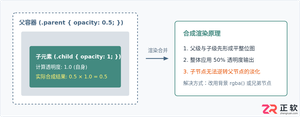
深入解析CSS中设置透明度的核心属性opacity,剖析子元素继承、事件穿透、层叠上下文等关键注意事项,并提供与rgba、hsla的实用选型对比。
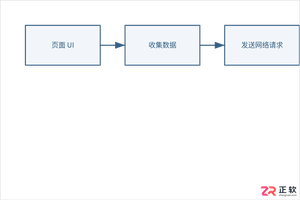
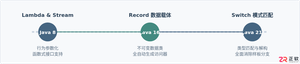
本文通过具体的旧版与新版代码对比,详细剖析Java 8引入的Lambda表达式、Java 14/16引入的Record类,以及Java 12至21逐步演进完善的Switch表达式与模式匹配,展示代码简化路径与避坑要点。
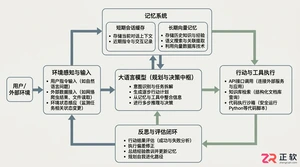
系统梳理AI智能体开发培训的核心知识模块、技术栈选型与典型实战项目,解析低代码平台与纯代码框架的差异,提供从零构建可落地智能体的完整学习与实施路径。
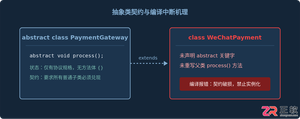
针对Java开发中常见的“子类未实现抽象方法”编译错误,深入分析报错原因,提供重写实现、声明抽象子类两种标准修复路径,并总结参数签名、访问修饰符等典型避坑要点。
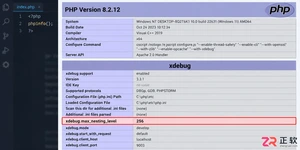
遇到PHP递归报错时,不要盲目调大max_nesting_level。本文教你区分Xdebug限制、内存耗尽和正则递归错误,提供代码级的终止条件优化与迭代替代方案,彻底解决栈溢出问题。
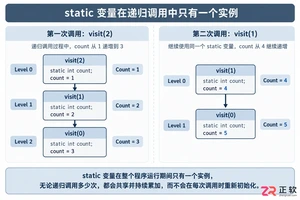
本文分析PHP递归中static变量导致的状态污染及引用传递引发的共享数据修改问题。提供具体的代码复现、缓存键设计建议及调试打印技巧,帮助开发者避免隐蔽的逻辑错误。
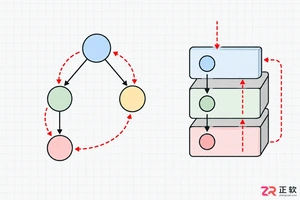
解析PHP递归函数在树形数据处理中的性能瓶颈,提供预加载数据消除I/O、使用显式栈替代深层递归的实战方案,帮助开发者在代码可读性与执行效率间做出合理取舍。
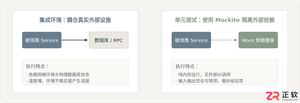
详细讲解在Java单元测试中如何使用Mockito模拟依赖对象,包括引入依赖、创建Mock、打桩返回值、行为验证以及Mock与Spy的核心差异和常见陷阱排查。

详细分析链表删除节点的时间复杂度,深入探讨单链表与双向链表在不同已知前提下的查找与删除开销,并结合完整代码与清晰图解进行对比总结。




Photoshop 2026 是 Adobe 推出的专业图像处理与视觉设计软件,支持 Windows、macOS 和 iPad 等平台,广泛应用于摄影修图、电商设计、平面海报、数字绘画及视觉合成等创作场景。

Blender 是一款免费开源、跨平台的专业 3D 创作软件,集建模、动画、渲染、视频编辑与视觉合成等功能于一体,广泛应用于影视动画、游戏设计和建筑可视化等领域。软件支持 Cycles 物理渲染器与 Eevee 实时渲染引擎,并提供多边形建模、骨骼绑定、物理模拟等专业工具。Blender 兼容 Windows、macOS 和 Linux 系统,安装包轻巧、运行流畅,依托活跃的全球开发者社区持续更新,是从初学者到专业创作者都值得选择的正版 3D 创作工具。


Photoshop 2026 是 Adobe 推出的专业图像处理与视觉设计软件,支持 Windows、macOS 和 iPad 等平台,广泛应用于摄影修图、电商设计、平面海报、数字绘画及视觉合成等创作场景。
Blender 是一款免费开源、跨平台的专业 3D 创作软件,集建模、动画、渲染、视频编辑与视觉合成等功能于一体,广泛应用于影视动画、游戏设计和建筑可视化等领域。软件支持 Cycles 物理渲染器与 Eevee 实时渲染引擎,并提供多边形建模、骨骼绑定、物理模拟等专业工具。Blender 兼容 Windows、macOS 和 Linux 系统,安装包轻巧、运行流畅,依托活跃的全球开发者社区持续更新,是从初学者到专业创作者都值得选择的正版 3D 创作工具。