

如何使用ASP.NET的OleDb类库操作Excel文件
ASP.NET借助OleDb类库可将Excel表格作为数据源直接操作,实现数据的增删查改。通过引用System.Data.OleDb命名空间,后端代码建立连接并读取工作表数据,前端提供文件上传控件提交Excel文件,即可完成数据预览与导入。需注意模板字段与代码一致、异常处理及文件安全。
一、使用背景
Excel表格大家都不陌生,它既能直观展示数据,又具备强大的筛选分析能力。像纳税申报表、财务报表、工资表、成绩排名表、数据采集表,本质上都是Excel表格的各种表现形式。
尤其在数据库操作中,批量采集数据时,如果一条条地从UI控件录入,效率低不说,还容易出错。相比之下,用Excel表格来做数据采集,效率高得多,也方便得多。
不过,问题来了——在没有可视化操作界面的代码世界里,怎么用代码去驱动Excel工作表呢?
答案就在OleDb数据源里。它提供了一套接口规范,能直接把Excel表格当作数据源来操作,实现增删查改,非常方便。
二、操作流程
1. 引用OldDb类库命名空间。如果还没安装,需要右击项目→管理Nuget程序包,搜索“OleDb”并安装。
using System.Data.OleDb;
2. 设置Excel表格模板规范:把表头命名好,按需求设计好要采集的字段。
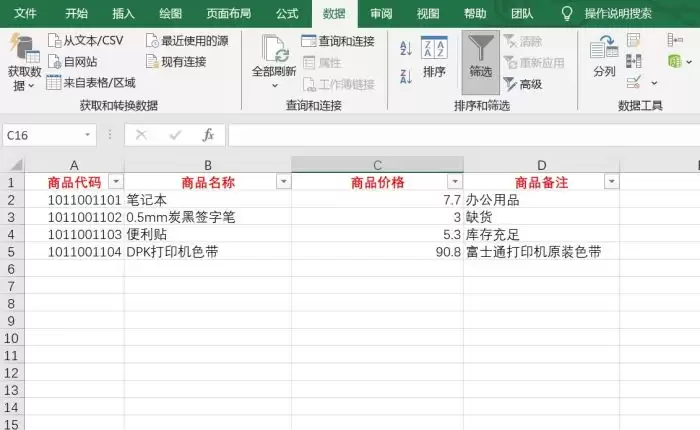
3. 后端代码编写:通过.ashx一般处理程序接收前端提交的Excel文件,建立OleDB数据连接。下面以导入商品数据为例,演示如何预览数据。
using System;
using System.Collections.Generic;
using System.Linq;
using System.Web;
using System.Web.Script.Serialization;
using iTextSharp;
using iTextSharp.text;
using iTextSharp.text.pdf;
using System.IO;
using System.Data.OleDb;

namespace MySolution1
{
    ///
    /// 建立前端适配的映射类
    ///
    class ReqParams
    {
        public string type { get; set; }
        public int payload { get; set; }
    }

    ///
    /// Handler1 的摘要说明
    ///
    public class Handler1 : IHttpHandler
    {
        public void ProcessRequest(HttpContext context)
        {
            //创建序列化工具
            Ja vaScriptSerializer serializer = new Ja vaScriptSerializer();
            //获取前端提交的JSON字符串
            string jsonString = context.Request.Form["param"].ToString();
            //反序列化映射JSON字符串
            ReqParams req = serializer.Deserialize(jsonString);
            //需要返回前端的状态
            object state = null;

            switch (req.type)
            {
                case "init":
                    state = new
                    {
                        time = DateTime.Now.ToLongTimeString(),
                        result=req.payload+1,
                    };
                    break;
                case "uploadFile":
                    //有文件上传负载到Request中,才下一步操作
                    if (context.Request.Files.Count > 0)
                    {
                        HttpPostedFile file = context.Request.Files["file"];
                        //制定文件保存路径
                        string sa vePath = context.Server.MapPath("~/Content/images/") + file.FileName;
                        try
                        {
                            //保存文件,记录状态信息
                            file.Sa veAs(sa vePath);
                            state = new
                            {
                                time = DateTime.Now.ToLongTimeString(),
                                result = "上传成功",
                                payload = req.payload + 1,
                                url = "/Content/images/" + file.FileName,
                            };
                        }
                        catch(Exception e)
                        {
                            //保存失败,抛出错误信息
                            state = new
                            {
                                time = DateTime.Now.ToLongTimeString(),
                                result = "上传失败!" + e.Message.ToString(),
                                payload=-1
                            };
                        }
                    }
                    break;
                case "getScorePDF":
                    state = CreatePDF(context);
                    break;
                case "previewExcelData":
                    state = PreviewExcelData(context);
                    break;
            }
            context.Response.Write(serializer.Serialize(state));
        }

        object PreviewExcelData(HttpContext context)
        {
            if(context.Request.Files.Count>0)
            {
                //获取客户端提交的excel文件
                HttpPostedFile excel = context.Request.Files["excel"];
                //保存到本地目录
                string path = context.Server.MapPath("~/Content/") + excel.FileName;
                excel.Sa veAs(path);
                //建立excel数据源连接
                string connectionString = $"Provider=Microsoft.ACE.OLEDB.12.0;Data Source={path};Extended Properties='Excel 12.0 Xml;HDR=YES;'";
                using (OleDbConnection conn = new OleDbConnection(connectionString))
                {
                    try
                    {
                        string sql = "select * from [sheet1$]";
                        //提供容器盛放业务数据
                        List list = new List();
                        conn.Open();
                        //获取数据读取器
                        OleDbDataReader dr = new OleDbCommand(sql, conn).ExecuteReader(System.Data.CommandBeha vior.CloseConnection);
                        //循环读取数据,添加到容器中
                        while (dr.Read())
                        {
                            list.Add(new GoodsInfo()
                            {
                                GoodsId=Convert.ToString(dr[0]),
                                GoodsName = Convert.ToString(dr[1]),
                                GoodsPrice = Convert.ToDecimal(dr[2]),
                                GoodsDesc = Convert.ToString(dr[3]),
                            });
                        }
                        return new
                        {
                            data=list,
                            time = DateTime.Now.ToString(),
                            success = true,
                            payload = 1,
                        };
                    }
                    finally
                    {
                        conn.Close();
                    }
                }
            }
            else
            {
                return new
                {
                    errorMsg="未获取到文件信息!",
                    time=DateTime.Now.ToString(),
                    success=false,
                    payload=-1,
                };
            }
        }

        object CreatePDF(HttpContext context)
        {
            Random ran = new Random(60);
            //指定pdf文件目录
            string path = context.Server.MapPath("~/Content/") + "scorePDF.pdf";
            //创建pdf文档、pdf写入器
            Document pdf = new Document(PageSize.A4, 10, 10, 40, 30);
            PdfWriter writer = PdfWriter.GetInstance(pdf, new FileStream(path, FileMode.Create));
            // 指定中文字体(如微软雅黑)
            string fontPath = @"C:\Windows\Fonts\msyh.ttc,0"; // 微软雅黑
            BaseFont baseFont = BaseFont.CreateFont(fontPath, BaseFont.IDENTITY_H, BaseFont.EMBEDDED);
            Font chineseFont = new Font(baseFont, 8);
            try
            {
                pdf.Open();
                //建立表格对象
                PdfPTable table = new PdfPTable(3 + 3 + 3);
                //添加表格的单元格数据
                table.AddCell(new PdfPCell(new Phrase("姓名", chineseFont)));
                table.AddCell(new PdfPCell(new Phrase("班级", chineseFont)));
                table.AddCell(new PdfPCell(new Phrase("准考证", chineseFont)));
                table.AddCell(new PdfPCell(new Phrase("语文", chineseFont)));
                table.AddCell(new PdfPCell(new Phrase("数学", chineseFont)));
                table.AddCell(new PdfPCell(new Phrase("英语", chineseFont)));
                table.AddCell(new PdfPCell(new Phrase("体育", chineseFont)));
                table.AddCell(new PdfPCell(new Phrase("美术", chineseFont)));
                table.AddCell(new PdfPCell(new Phrase("劳动", chineseFont)));
                //也可以添加表格的行
                PdfPRow row = new PdfPRow(new PdfPCell[]
                {
                new PdfPCell(new Phrase("李明",chineseFont)),
                new PdfPCell(new Phrase("一年级二班",chineseFont)),
                new PdfPCell(new Phrase("0500090901",chineseFont)),
                new PdfPCell(new Phrase(ran.Next(60,100).ToString(),chineseFont)),
                new PdfPCell(new Phrase(ran.Next(60,100).ToString(),chineseFont)),
                new PdfPCell(new Phrase(ran.Next(60,100).ToString(),chineseFont)),
                new PdfPCell(new Phrase(ran.Next(60,100).ToString(),chineseFont)),
                new PdfPCell(new Phrase(ran.Next(60,100).ToString(),chineseFont)),
                new PdfPCell(new Phrase(ran.Next(60,100).ToString(),chineseFont)),
                });
                table.Rows.Add(row);
                //把表格放入pdf文档
                pdf.Add(table);
                return new
                {
                    time = DateTime.Now.ToLongTimeString(),
                    result = "操作成功!",
                    url = "/Content/scorePDF.pdf",
                    success = true
                };
            }
            catch(Exception e)
            {
                throw new Exception(e.Message.ToString());
            }
            finally
            {
                pdf.Close();
            }
        }

        public bool IsReusable
        {
            get
            {
                return false;
            }
        }
    }

    [Serializable]
    class GoodsInfo
    {
        public string GoodsId { get; set; }
        public string GoodsName { get; set; }
        public decimal GoodsPrice { get; set; }
        public string GoodsDesc { get; set; }
    }
}
4. 前端代码编写:提供一个input文件上传控件来获取Excel文件,按接口规范提交网络请求给后端,读取结果后渲染数据进行预览。
<%@ Page Language="C#" AutoEventWireup="true" CodeBehind="WebForm3.aspx.cs" Inherits="MySolution1.WebForm3" %>
使用ASP.NET读取Excel表格
商品代码
商品名称
商品价格
商品备注
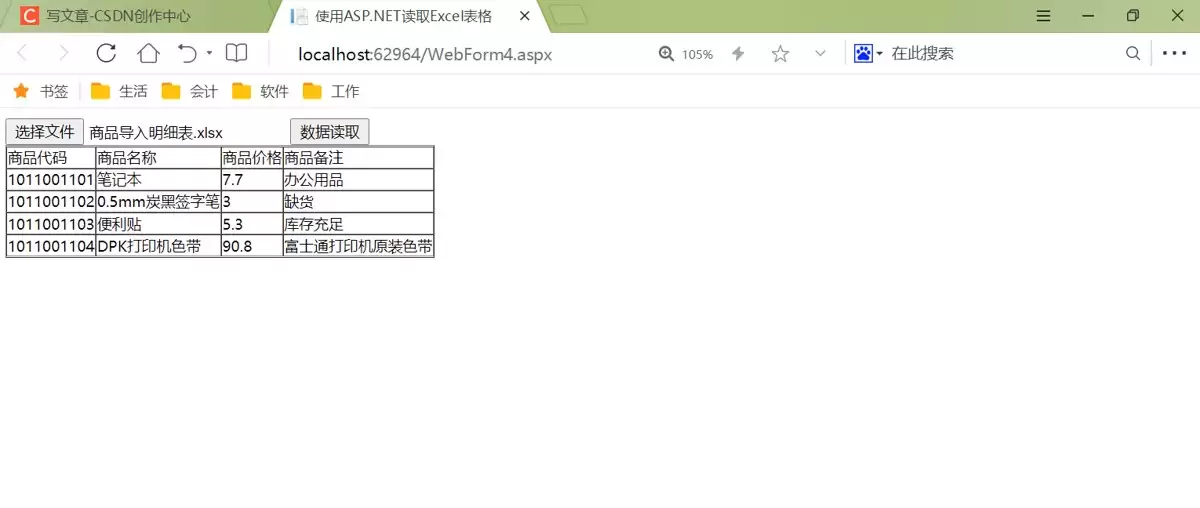
5. 编译运行页面:上传Excel文件后,就可以查看结果。
三、注意事项
1. Excel模板的设计必须与后台读取逻辑保持一致。比如上面商品管理的Excel导入模板,数据列和后台读取的字段是一一对应的,不能对不上。
2. 数据库操作一定要加上异常处理(比如try-catch-finally),避免数据读取完了连接没关闭,留下隐患。
3. 还要注意Excel文件来源的安全性。数据导入模板必须是事先设定好、经过视图加密的,防止宏病毒趁虚而入。
吉光卡片安装难吗?本文详解iPhone端安装条件:需iOS 16.1+、Apple ID及稳定网络。提供从App Store搜索下载、权限授权到解决下载失败、闪退问题的完整实操指南,助您快速开始卡片设计。

想知道B站账号是哪年注册的?本文详解通过个人主页、创作中心日历、最早动态记录查询注册时间的方法,并区分注册时间与成为UP主的时间,提供安全查询建议。
学习如何使用证照之星精确修改证件照大小。涵盖导入照片、设置一寸二寸或自定义像素、锁定比例调整尺寸、裁剪构图及高质量导出保存的全步骤操作,解决照片变形和尺寸不符问题。
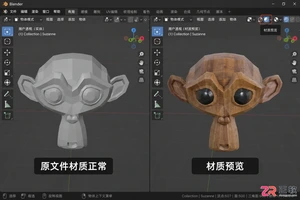
解决Blender导出OBJ格式时材质丢失、模型变灰的问题。详解开启MTL写出、设置相对路径、整理纹理文件及导入端检查步骤,确保3D模型在不同软件间正确显示颜色与贴图。

想知道如何在会声会影中让字幕跟着移动的目标走?本文详解如何利用关键帧记录位置和大小的变化,轻松实现精准的视频遮挡效果,适合处理隐私打码或动态信息覆盖。

想知道蛙蛙写作安装包多大?中国区App Store当前显示为68.6 MB。本文教你如何在应用页核对大小、开发者及系统要求,并区分下载包与安装后实际占用的区别,确保手机空间充足。
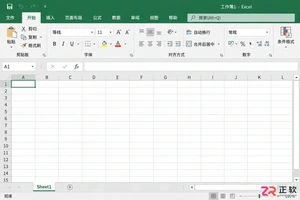
在Excel中如何快速输入标准的乘号“×”?本文详解Windows数字小键盘快捷键Alt+0215、插入符号功能及UNICHAR函数的使用方法,帮助职场人高效录入规范符号,避免混淆字母x与数学符号。
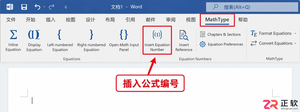
遇到Word中MathType公式编号跳号或引用不一致?本教程演示如何使用Insert Equation Number和Update Equation Numbers功能,快速更新整篇文档的公式编号,并检查章节设置与正文引用,确保学术文档格式规范。
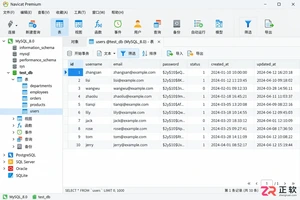
想在 Navicat 中只导出符合条件的部分数据?本教程详解如何通过数据网格筛选导出当前记录,以及利用导出向导自定义字段和格式。包含操作位置、设置要点及防错检查清单,适合初学者快速上手。
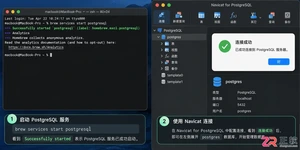
详解在 macOS 上使用 Homebrew 安装 PostgreSQL 的步骤,包括服务启动、psql 命令行测试以及使用 Navicat for PostgreSQL 进行图形化连接的方法,适合 Mac 开发环境快速搭建。




IntelliJ IDEA 是 JetBrains 推出的专业集成开发环境,重点服务于 Java、Kotlin 与 JVM 项目开发。软件集成代码补全、静态检查、重构、调试、测试、版本控制及构建工具,并可借助插件扩展语言和框架支持。

JetBrains PyCharm 是面向 Python 开发者的集成开发环境,提供智能补全、代码检查、重构、调试、测试、版本控制及虚拟环境管理功能。Mac 版兼容 Intel 与 Apple 芯片,核心功能可免费使用。

JetBrains WebStorm 是面向 JavaScript、TypeScript 和现代 Web 技术的专业集成开发环境,可智能理解项目结构,提供代码补全、重构、错误检查、运行调试、测试及 Git 工具。

JetBrains IntelliJ IDEA 是以 Java、Kotlin 和 JVM 项目为核心的专业集成开发环境,提供智能补全、代码检查、安全重构、调试、测试、版本控制及构建工具集成。统一发行版的核心功能可免费用于商业和非商业项目,

PhpStorm 是 JetBrains 面向 PHP 与现代 Web 开发打造的专业集成开发环境,提供代码补全、静态检查、重构、调试、测试、数据库、版本控制及前端语言支持。Windows 用户可直接下载安装程序,

PyCharm 是 JetBrains 推出的 Python 集成开发环境,提供智能代码补全、错误检查、重构、调试、测试、Git、终端及 Jupyter Notebook 支持。统一版安装后可体验 30 天 Pro 功能,