

.NET8使用SignalR实现实时通信的完整指南
在.NET8中,SignalR实现实时通信需配置服务端和CORS,创建Hub类处理用户登录、群组管理和消息发送,支持浏览器及WinForms客户端。通信技术按WebSocket优先、Server-SentEvents备选的顺序自动选择,适合构建高效低延迟的实时应用。
SignalR 是实时通信领域的老牌选手了,它能在服务器和客户端之间搭建起双向通信的桥梁。这篇文章会带你在 .NET 8 里把 SignalR 跑起来,从服务端配置、CORS 设置,到前端浏览器调用、WinForms 客户端实现,全流程走一遍。顺便还会深入聊聊 SignalR 选择通信技术的那套逻辑——WebSocket → Server-Sent Events (SSE) 的优先级顺序,到底是怎么一回事。
一、服务端实现
1. 安装 SignalR 包
先把核心包请进项目:
dotnet add package Microsoft.AspNetCore.SignalR
2. 配置 SignalR 与 CORS
跨域问题在 SignalR 里很常见,尤其是前后端分离的场景。所以 Program.cs 里必须把 CORS 安排明白:
var builder = WebApplication.CreateBuilder(args);

// 添加 SignalR 服务
builder.Services.AddSignalR();

// 配置 CORS
builder.Services.AddCors(options =>
{
    options.AddPolicy("AllowAll", policy =>
    {
        policy.WithOrigins("https://localhost:7100") // 允许的前端地址
              .AllowAnyHeader()
              .AllowAnyMethod()
              .AllowCredentials(); // 允许携带认证信息(SignalR 必需)
    });
});

var app = builder.Build();

// 使用 CORS
app.UseCors("AllowAll");

// 映射 SignalR Hub
app.MapHub("/chatHub");

app.Run();
注意 AllowCredentials() 这一行——SignalR 默认要求带上认证信息,少了它连接会报错。
3. 创建 Hub 类
创建一个继承自 Hub 的类,用来处理客户端连接、消息收发这些核心逻辑。下面这个 ChatHub 实现了用户登录、群组管理、以及多种消息发送方式:
using Microsoft.AspNetCore.SignalR;
using System.Collections.Concurrent;

namespace SignalRDemo;

public class ChatHub : Hub
{
    // 存储用户与连接ID的映射
    private static readonly ConcurrentDictionary _userConnections = new();
    // 存储群组与连接ID的映射
    private static readonly ConcurrentDictionary> _groupConnections = new();

    ///
    /// 客户端连接时触发
    ///
    public override async Task OnConnectedAsync()
    {
        Console.WriteLine($"客户端 {Context.ConnectionId} 已连接");
        await base.OnConnectedAsync();
    }

    ///
    /// 客户端断开连接时触发
    ///
    public override async Task OnDisconnectedAsync(Exception? exception)
    {
        Console.WriteLine($"客户端 {Context.ConnectionId} 已断开连接");

        // 从用户映射中移除
        var user = _userConnections.FirstOrDefault(kv => kv.Value == Context.ConnectionId).Key;
        if (!string.IsNullOrEmpty(user))
        {
            _userConnections.TryRemove(user, out _);
        }

        // 从所有群组中移除
        foreach (var group in _groupConnections.Keys)
        {
            _groupConnections[group].Remove(Context.ConnectionId);
        }

        await base.OnDisconnectedAsync(exception);
    }

    ///
    /// 用户登录(绑定用户名和连接ID)
    ///
    public async Task Login(string username)
    {
        _userConnections[username] = Context.ConnectionId;
        await Clients.Caller.SendAsync("LoginSuccess", $"你已登录为 {username}");
    }

    ///
    /// 加入群组
    ///
    public async Task JoinGroup(string groupName)
    {
        if (!_groupConnections.ContainsKey(groupName))
        {
            _groupConnections[groupName] = new HashSet();
        }
        _groupConnections[groupName].Add(Context.ConnectionId);
        await Clients.Caller.SendAsync("JoinGroupSuccess", $"你已加入群组 {groupName}");
    }

    ///
    /// 发送消息给所有人
    ///
    public async Task SendMessageToAll(string user, string message)
    {
        await Clients.All.SendAsync("ReceiveMessage", user, message);
    }

    ///
    /// 发送消息给单个人
    ///
    public async Task SendMessageToUser(string targetUser, string user, string message)
    {
        if (_userConnections.TryGetValue(targetUser, out var connectionId))
        {
            await Clients.Client(connectionId).SendAsync("ReceiveMessage", user, message);
        }
        else
        {
            await Clients.Caller.SendAsync("Error", $"用户 {targetUser} 不在线");
        }
    }

    ///
    /// 发送消息给多个人
    ///
    public async Task SendMessageToUsers(IReadOnlyList targetUsers, string user, string message)
    {
        var connectionIds = new List();
        foreach (var targetUser in targetUsers)
        {
            if (_userConnections.TryGetValue(targetUser, out var connectionId))
            {
                connectionIds.Add(connectionId);
            }
        }

        if (connectionIds.Any())
        {
            await Clients.Clients(connectionIds).SendAsync("ReceiveMessage", user, message);
        }
        else
        {
            await Clients.Caller.SendAsync("Error", "没有目标用户在线");
        }
    }

    ///
    /// 发送消息给群组
    ///
    public async Task SendMessageToGroup(string groupName, string user, string message)
    {
        if (_groupConnections.TryGetValue(groupName, out var connections))
        {
            if (connections.Any())
            {
                await Clients.Clients(connections).SendAsync("ReceiveMessage", user, message);
            }
            else
            {
                await Clients.Caller.SendAsync("Error", $"群组 {groupName} 没有成员");
            }
        }
        else
        {
            await Clients.Caller.SendAsync("Error", $"群组 {groupName} 不存在");
        }
    }
}
这里用 ConcurrentDictionary 来维护用户和连接ID的映射,以及群组和成员列表的映射。实际生产环境可能需要数据库或者 Redis 来持久化,但 demo 阶段这样够用。
二、前端调用(浏览器)
1. 安装 SignalR 客户端
在前端项目里装客户端库:
npm install @microsoft/signalr
2. 前端代码示例
下面是一个简单的 HTML 页面,通过 Ja vaScript 连接 SignalR 并实现登录、发送消息等功能:
SignalR Chat
注意这里的 withUrl 地址要和后端映射的 /chatHub 一致,并且端口别写错。
三、WinForms 客户端调用
1. 安装 SignalR 客户端包
在 WinForms 项目里通过 NuGet 安装:
dotnet add package Microsoft.AspNetCore.SignalR.Client
2. WinForms 客户端代码
在窗体上拖几个控件——用户名输入框、消息输入框、登录按钮、发送给所有人按钮,再加一个 ListBox 用来显示消息。代码逻辑如下:
using Microsoft.AspNetCore.SignalR.Client;
using System;
using System.Windows.Forms;

namespace SignalRWinFormsClient;

public partial class Form1 : Form
{
    private HubConnection _connection;
    private string _username;

    public Form1()
    {
        InitializeComponent();
    }

    private async void Form1_Load(object sender, EventArgs e)
    {
        // 连接 SignalR
        _connection = new HubConnectionBuilder()
            .WithUrl("https://localhost:7138/chatHub")
            .Build();

        // 接收消息
        _connection.On("ReceiveMessage", (user, message) =>
        {
            Invoke(new Action(() =>
            {
                listBoxMessages.Items.Add($"{user}: {message}");
            }));
        });

        try
        {
            await _connection.StartAsync();
            listBoxMessages.Items.Add("已连接到 SignalR 服务端");
        }
        catch (Exception ex)
        {
            listBoxMessages.Items.Add($"连接失败:{ex.Message}");
        }
    }

    private async void btnLogin_Click(object sender, EventArgs e)
    {
        _username = txtUsername.Text;
        try
        {
            await _connection.InvokeAsync("Login", _username);
            listBoxMessages.Items.Add($"你已登录为 {_username}");
        }
        catch (Exception ex)
        {
            listBoxMessages.Items.Add($"登录失败:{ex.Message}");
        }
    }

    private async void btnSendToAll_Click(object sender, EventArgs e)
    {
        var message = txtMessage.Text;
        try
        {
            await _connection.InvokeAsync("SendMessageToAll", _username, message);
            txtMessage.Clear();
        }
        catch (Exception ex)
        {
            listBoxMessages.Items.Add($"发送失败:{ex.Message}");
        }
    }
}
WinForms 里要注意 UI 线程的调用——Invoke 把更新操作切回主线程,否则会抛异常。
四、SignalR 通信技术顺序
SignalR 在建立连接时,会根据浏览器和服务器的支持情况自动选择最佳通信技术。这个选择顺序很有意思,也是很多开发者容易忽略的细节。它的优先级是:
1. WebSocket
- 优先级最高,是 SignalR 的首选通信方式。
- 全双工通信,性能最好,延迟最低。
- 适用于大多数现代浏览器(Chrome、Firefox、Edge、Safari 等)。
- 使用标准的 WebSocket 协议(
ws://或wss://)。
2. Server-Sent Events (SSE)
- 如果 WebSocket 不可用(比如浏览器不支持,或者被防火墙拦截),SignalR 就会退而求其次尝试 SSE。
- 单向通信——服务器可以实时向客户端推送数据,但客户端没法通过这个通道往服务器推数据。
- 基于 HTTP 协议,使用
EventSourceAPI。 - 适合那些只需要实时更新、不需要双向交互的场景,比如股票行情、新闻推送。
3. 长轮询 (Long Polling)
- 如果 SSE 也走不通,SignalR 会拿长轮询当最后的底牌。
- 客户端发一个请求到服务器,服务器把连接一直挂着,直到有数据要发或者超时。超时后客户端立刻发起下一个请求。
- 性能最差,但兼容性最好——所有浏览器都能用,包括那些老古董。
通信技术选择流程
客户端启动时,会先发一个 HTTP 请求到 /chatHub/negotiate 端点,拿回服务器支持的技术列表。然后客户端按照 WebSocket → SSE → 长轮询 的顺序尝试。一旦某个技术成功建立连接,后续通信就全部基于它。这个过程对开发者是完全透明的,但了解它有助于排查连接问题——比如为什么明明支持 WebSocket 却用了长轮询?多半是 CORS 或者中间件配置没到位。
技术对比
| 技术 | 双向通信 | 性能 | 兼容性 |
|---|---|---|---|
| WebSocket | 是 | 高 | 现代浏览器 |
| SSE | 否(服务器到客户端) | 中 | 大多数现代浏览器 |
| 长轮询 | 是 | 低 | 所有浏览器 |
五、注意事项
- CORS 配置:服务端必须正确配置 CORS,允许客户端来源并启用
AllowCredentials,否则前端连接会报跨域错误。 - 连接管理:用好
OnConnectedAsync和OnDisconnectedAsync,可以记录在线状态、清理资源。 - 用户映射:维护用户与
ConnectionId的映射关系,是实现单播和组播的基础。 - 群组管理:可以使用 SignalR 内置的
Groups类,也可以像上面那样自己维护字典,灵活度更高。 - 错误处理:客户端和服务端都要处理连接中断和异常,比如重连机制。
- 扩展性:如果项目规模上去了,单机 SignalR 撑不住,可以考虑用 Redis 做后端背板,实现多服务器间的消息广播。
通过这篇文章,你应该能快速在 .NET 8 里把 SignalR 跑起来,并且支持浏览器和 WinForms 两种客户端。实时通信的坑不少,但把核心链路打通了,后面的扩展就水到渠成了。
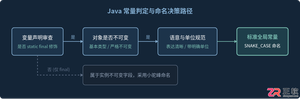
深入解析Java常量命名标准、大写下划线语义规则,剖析接口常量反模式的危害与本质原因,并提供枚举、不可实例化常量工具类等工业级最佳替代方案。
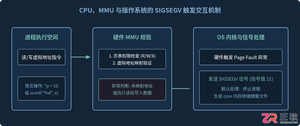
针对C语言常见的段错误(Segmentation fault)问题,详细剖析内存非法访问根因,提供结合GDB、Core Dump与AddressSanitizer的标准化排查解决步骤与预防方法。
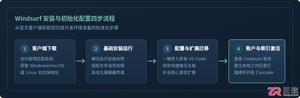
本文提供全面的Windsurf开发工具安装与使用详细教程,覆盖客户端下载安装、环境配置与VS Code插件迁移、Cascade核心协作中枢使用技巧、Chat与Write双模式实战及高效开发规范。
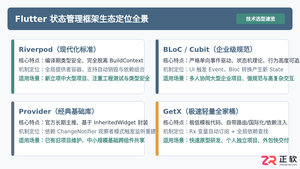
全面盘点Flutter主流状态管理框架,深度解析Provider、Riverpod、Bloc与GetX的核心机制、优缺点及适用场景,提供系统化的状态管理选型指南。
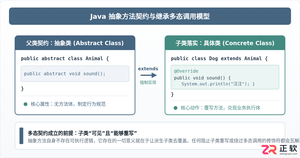
深入剖析Java中抽象方法为何严禁使用private和static修饰符。从面向对象契约规范、方法继承重写、JVM动态绑定(invokevirtual)与静态解析(invokestatic)等底层机制展开详细推导,结合编译报错示例与全景对比,彻底理清修饰符限制背后的设计逻辑。

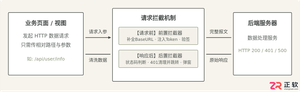
详细讲解uni-app中网络请求拦截的配置方法与实现路径,包含uni.addInterceptor原生API拦截与Promise二次封装方案、Token注入、全局错误处理及踩坑提醒。
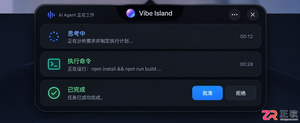
Vibe Island支持独立于macOS系统的语言设置。本文详解如何在Settings > General中将界面切换为简体中文,并验证Agent会话、审批按钮等核心功能的中文显示效果。

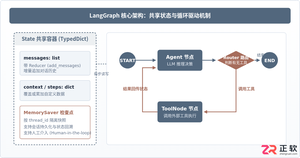
本篇LangGraph Python中文入门教程详解,系统梳理StateGraph状态机定义、节点编写、边与条件路由、检查点持久化(MemorySaver)等核心机制,提供从环境安装到完整循环智能体构建的代码示例与实操指导。




IntelliJ IDEA 是 JetBrains 推出的专业集成开发环境,重点服务于 Java、Kotlin 与 JVM 项目开发。软件集成代码补全、静态检查、重构、调试、测试、版本控制及构建工具,并可借助插件扩展语言和框架支持。

JetBrains PyCharm 是面向 Python 开发者的集成开发环境,提供智能补全、代码检查、重构、调试、测试、版本控制及虚拟环境管理功能。Mac 版兼容 Intel 与 Apple 芯片,核心功能可免费使用。
JetBrains WebStorm 是面向 JavaScript、TypeScript 和现代 Web 技术的专业集成开发环境,可智能理解项目结构,提供代码补全、重构、错误检查、运行调试、测试及 Git 工具。

JetBrains IntelliJ IDEA 是以 Java、Kotlin 和 JVM 项目为核心的专业集成开发环境,提供智能补全、代码检查、安全重构、调试、测试、版本控制及构建工具集成。统一发行版的核心功能可免费用于商业和非商业项目,

PhpStorm 是 JetBrains 面向 PHP 与现代 Web 开发打造的专业集成开发环境,提供代码补全、静态检查、重构、调试、测试、数据库、版本控制及前端语言支持。Windows 用户可直接下载安装程序,

PyCharm 是 JetBrains 推出的 Python 集成开发环境,提供智能代码补全、错误检查、重构、调试、测试、Git、终端及 Jupyter Notebook 支持。统一版安装后可体验 30 天 Pro 功能,


