

VBS批量重命名文件并且操作前备份原有文件
提供两款VBS脚本用于批量重命名文件:简洁版从配置文件读取文件路径并执行重命名;多功能版支持加前缀、后缀、自增数字和数组映射等多种模式,操作前自动备份源文件夹。
VBS 版批量重命名
批量重命名文件是日常运维中很常见的需求,下面这个VBS脚本正好能解决这类问题,它包含两个版本:一个简单的配置读取型,另一个功能更全面的多功能版。先看简洁版——直接从配置文件读取文件路径,然后对每个文件执行重命名操作。rem 读取配置文件
Dim config
config = "conf.txt"
set fso=createobject("scripting.filesystemobject")
set a=createobject("scripting.dictionary")
set file=fso.opentextfile(config)
do while file.atendofstream<>true
m=m+1
a.add m,file.readline
src = a(m)
RenameSubPage src
loop
file.close
Set fso =Nothing
msgbox "操作已完成" ,4096,"文件重命名"
Sub RenameSubPage(strURL)
Dim path
For i=19 To 100
path = Replace(strURL , ".html", "_"& i & ".html")
If fso.fileexists(path) =True Then
target = path & ".tmp"
fso.movefile path , target
Else
' do nothing
End If
Next
End Sub
这里依赖的配置文件 `conf.txt` 内容很简单,一行一个文件路径,比如:
D:\abc.html
D:\def.html
其它代码
下面是一个功能更完整的版本,支持多种重命名模式(加前缀、加后缀、自增数字、数组映射),并且在操作前会自动备份文件夹。核心函数如下:
'==========================================================================
'
' VBScript Source File -- Created with SAPIEN Technologies PrimalScript 4.0
'
' NAME:
'
' AUTHOR: Microsoft , Microsoft
' DATE : 2014/7/9
'
' COMMENT: '批量修改文件夹下对应的所有文件名
'
'==========================================================================
'选择我的电脑作为根目录,来选择目录
Const MY_COMPUTER = &H11&
Const WINDOW_HANDLE = 0
Const OPTIONS = 0
Set objShell = CreateObject("Shell.Application")
Set objFolder = objShell.Namespace(MY_COMPUTER)
Set objFolderItem = objFolder.Self
strPath = objFolderItem.Path
Set objShell = CreateObject("Shell.Application")
Set objFolder = objShell.BrowseForFolder _
(WINDOW_HANDLE, "Select a folder:", OPTIONS, strPath)
If objFolder Is Nothing Then
Wscript.Quit
End If
Set objFolderItem = objFolder.Self
objPath = objFolderItem.Path
'MsgBox objFolderItem.name
'===================================================================
'选择指定盘符下的目录
' Const WINDOW_HANDLE = 0
' Const OPTIONS = 0
'
' Set objShell = CreateObject("Shell.Application")
' Set objFolder = objShell.BrowseForFolder _
' (WINDOW_HANDLE, "Select a folder:", OPTIONS, "C:")
'
' If objFolder Is Nothing Then
' Wscript.Quit
' End If
'
' Set objFolderItem = objFolder.Self
' objPath = objFolderItem.Path
'
' MsgBox objPath
'=========================================================================
'定义变量
dim file_path,prefix_name,suffix_name,repeat_name,repeat_edit
Dim OneLine,TwoLine,ThreeLine,FourLine,FiveLine
i=0
test = createobject("Scripting.FileSystemObject").GetFile(Wscript.ScriptFullName).ParentFolder.Path
'Wscript.echo test
filepath=test&"config.ini"
'WScript.Echo filepath
' file_path = "C:UsersAdministratorDesktop1music"'目标文件夹的路径
dst_file_path="C:"&objFolderItem.name&"_bak"
file_path=objPath
'-----得到文件夹路径,且打开配置文件
Set fso = CreateObject("Scripting.FileSystemObject")
Set folder = fso.getfolder(file_path)
Set fs = folder.files
Set file=fso.OpenTextFile(filepath,1)
'----------------在操作前,备份一下原有的文件
fso.CopyFolder file_path,dst_file_path,True
'----------------------------------
'取出第一行中的两个数
OneLine=file.ReadLine
OneLineStr=Split(OneLine,"=")
OneLineCount=UBound(split(OneLine,"="))
For i1=0 To OneLineCount
'WScript.Echo OneLineStr(i1)
Next
'-------------------------------------
'取出第二行中的两个数
TwoLine=file.ReadLine
TwoLineStr=Split(TwoLine,"=")
TwoLineCount=UBound(split(TwoLine,"="))
For i2=0 To TwoLineCount
'WScript.Echo TwoLineStr(i2)
Next
'-------------------------------------------
'取出第三行中的两个数
ThreeLine=file.ReadLine
ThreeLineStr=Split(ThreeLine,"=")
ThreeLineCount=UBound(split(ThreeLine,"="))
For i3=0 To ThreeLineCount
'WScript.Echo ThreeLineStr(i3)
Next
'-------------------------------------------
'取出第四行中的两个数
FourLine=file.ReadLine
FourLineStr=Split(FourLine,"=")
FourLineCount=UBound(split(FourLine,"="))
For i4=0 To FourLineCount
'WScript.Echo FourLineStr(i4)
Next
'-----------------------------------------
'取出第五行中的两个数
FiveLine=file.ReadLine
FiveLineStr=Split(FiveLine,"=")
FiveLineCount=Ubound(split(FiveLine,"="))
For i5=0 To FiveLineCount
'WScript.Echo FiveLineStr(i5)
Next
'---------------------------------------------
'调用过程
'Function_Main()
Function Function_Main()
If OneLineStr(1)="true" Then
Function_Prefix_Name()
Elseif OneLineStr(1)="false" Then
Function_Suffix_Name()
Elseif OneLineStr(1)="number" Then
Function_Number_Value()
Elseif OneLineStr(1)="array" Then
Function_MyArrayReName()
Elseif OneLineStr(1)="" Then
WScript.Quit
End If
End Function
'-----------------------------------------
'在原有名称前增加前缀
Function Function_Prefix_Name()
For Each file in fs
File.Name=TwoLineStr(1)&File.Name
Next
End Function
'--------------------------------------
'在原有名称前增加后缀
Function Function_Suffix_Name()
For Each file in fs
Name=Mid(file.name,1,instrrev(file.name,".")-1) '取到.号前面的文件名
Format=Mid(file.name,instrrev(file.name,".")) '取到.号后面的后缀格式
file.Name=Name&ThreeLineStr(1)&Format
Next
End Function
'--------------------------------------------
'在原有名称前增加有序自增数字
Function Function_Number_Value()
For Each file In fs
FourLineStr(1)=FourLineStr(1)+1
file.name=FourLineStr(1)&file.name
Next
End Function
'Function_Suffix_Name()
'--------------------------------------------------
'批量更改文件名称
Function Function_MyArrayReName()
Const BeforAlarm="发生犯人暴狱,请注意观察"
Const AfterAlarm="发生犯人暴狱,各小组按预案处置"
Dim MyArray(12)
n=1
y=0
For i=0 To 12
If i=11 Then
MyArray(i)="监门哨"
Elseif i=12 Then
MyArray(i)="自卫哨"
Else
MyArray(i)=n&"号哨"
n=n+1
End If
' WScript.Echo MyArray(i)
Next
For Each file In fs
Format=Mid(file.name,instrrev(file.name,"."))
'MsgBox Format
'MsgBox MyArray(y)
If FiveLineStr(1)="before" Then
file.name=MyArray(y)&BeforAlarm&Format
Elseif FiveLineStr(1)="after" Then
file.name=MyArray(y)&AfterAlarm&Format
Else
MsgBox "请先设置是确认前还是确认后!",,"提示"
WScript.Quit
End If
y=y+1
'WScript.Echo file.name
Next
End Function

'=======================================================================
' If prefix_name <> "" then'批量加前缀
' For each f in fs
' f.name = prefix_name&f.name
' Next
' End If
'
' if suffix_name <> "" then'批量加后缀
' For each f in fs
' name = Mid(f.name,1,InstrRev(f.name,".")-1)
' format = Mid(f.name,InstrRev(f.name,"."))
' f.name = name & suffix_name & format
' Next
' end If
'
' if repeat_name <> "" then'批量删除相同字符
' For each f in fs
' On Error Resume Next
' f.name = Replace(f.name,repeat_name,repeat_edit)
' Next
' end If
' '-----文件操作结束
'
' set fso = nothing'释放内存
'
' MsgBox("完成!")
这个版本需要配合一个配置文件 `config.ini`,其格式如下:
config.ini文件内容:
statue=
prefix_name=[320kbp]
suffix_name=[结束]
i=20140100
array=
**参数配置说明:** - `statue=true` 时,功能为增加前缀(前缀内容由 `prefix_name` 指定)。 - `statue=false` 时,功能为增加后缀(后缀内容由 `suffix_name` 指定)。 - `statue=number` 时,功能为增加有序自增数字(起始值由 `i` 指定)。 - `statue=array` 时,调用数组函数,此时需要配合 `array` 参数:`array=before` 表示在文件名前加数组元素和固定字符串,`array=after` 表示在后加。如果 `array` 为空,则会弹出提示并退出脚本。 - `statue` 为空时,脚本不做任何处理直接退出。 这个脚本的核心是利用 FileSystemObject 遍历文件夹,结合字符串处理函数(Mid、Split、Replace)实现灵活的重命名逻辑。操作前会自动在 C 盘根目录生成一个 `_bak` 备份文件夹,避免误操作后无法恢复。
VBS脚本实现文件批量处理:一脚本从配置文件读取关键字,遍历文件夹内容,匹配后重命名添加.bak后缀并记日志;另一脚本根据文件路径列表,对衍生文件批量重命名添加.tmp后缀。
VBS调用Shell.Application的ShellExecute方法时需先创建对象。参数包括文件名、附加参数、目录、操作和窗口类型。操作包括编辑、查找、打开、打印、属性、以管理员身份运行六种,窗口类型用0至10数值控制。实战示例以管理员权限运行cmd.exe添加用户。
利用ADODB.Stream对象,VBScript可实现字符串编码转换。核心思路是先将字符串按源编码转为二进制字节流,再按目标编码还原。提供StringToBytes、BytesToString和AlterCharset三个函数,支持GB2312与ISO-8859-1等单字节编码间的转换,适用于旧系统或硬件交互场景。

通过WMI调用Win32_PingStatus实现批量Ping检测,支持循环监测与断线计数。连续失败10次自动发送邮件告警,日志和控制台同步输出。需CScript环境运行,脚本已自动处理切换,适用于多IP持续监控场景。
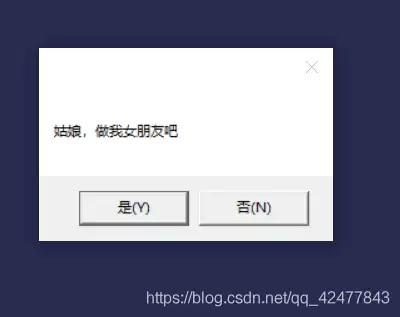
利用VBS脚本制作循环表白弹窗,点击“否”时依次显示“女友最大”“工资上交”等六个承诺,点击“是”则展现字符爱心与浪漫告白。操作需新建文本文档,粘贴代码后另存为ANSI编码的.vbs文件,双击运行即可。

利用VBS脚本通过InternetExplorer.Application对象操控网页,自动填写账号密码并提交,实现开机自动登录网站。需根据实际页面修改网址、表单及输入框的name属性。将脚本放入系统启动文件夹即可开机自启。

VBS是Windows内置脚本语言,无需安装环境,用记事本即可编写。通过Msgbox和Inputbox函数实现弹窗输出与交互。编写时需注意:文件后缀为.vbs,符号使用英文半角,编码格式改为ANSI,否则中文可能乱码。
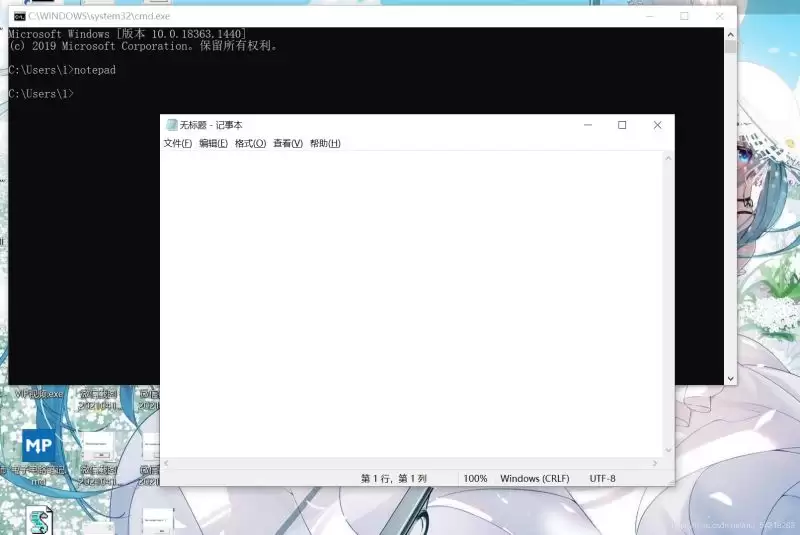
VBS脚本基础语法涵盖变量定义、输入输出、判断与循环语句。变量可用“dim”声明,支持自动类型推断;输入输出分别通过inputbox和msgbox实现;判断语句以if...then...else...endif结构为主;循环包括do-loop(支持until、while条件及exitdo控制)和for-next结构。

使用VBS脚本可收集域内远程或本地计算机的软件及Windows版本信息,结果保存为以计算机名命名的txt文件,支持网络路径或脚本目录。脚本内置过滤规则,自动剔除补丁包、Office组件及NVIDIA、Intel驱动等系统组件,兼容32位和64位系统。
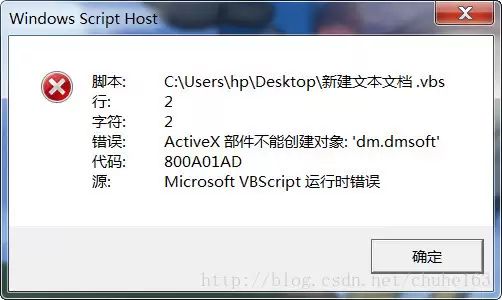
VBS脚本在64位系统中因默认调用64位WScript.exe导致32位ActiveX组件无法创建,出现800A01AD错误。可通过修改注册表将解释器切换为32位版本,或直接更改脚本打开方式为SysWOW64下的wscript.exe解决。若在ASP环境中,可重新注册ADODB.Stream组件或启用IIS应用程序池的32位模式。





火山引擎是字节跳动旗下企业级云与AI服务平台。聚焦大模型核心能力,依托字节自研豆包多模态大模型,凭借火山方舟一站式平台,提供模型精调、推理部署、智能应用搭建等全链路服务,结合高性能AI算力,助力各行业快速落地大模型数字化与智能化应用。



